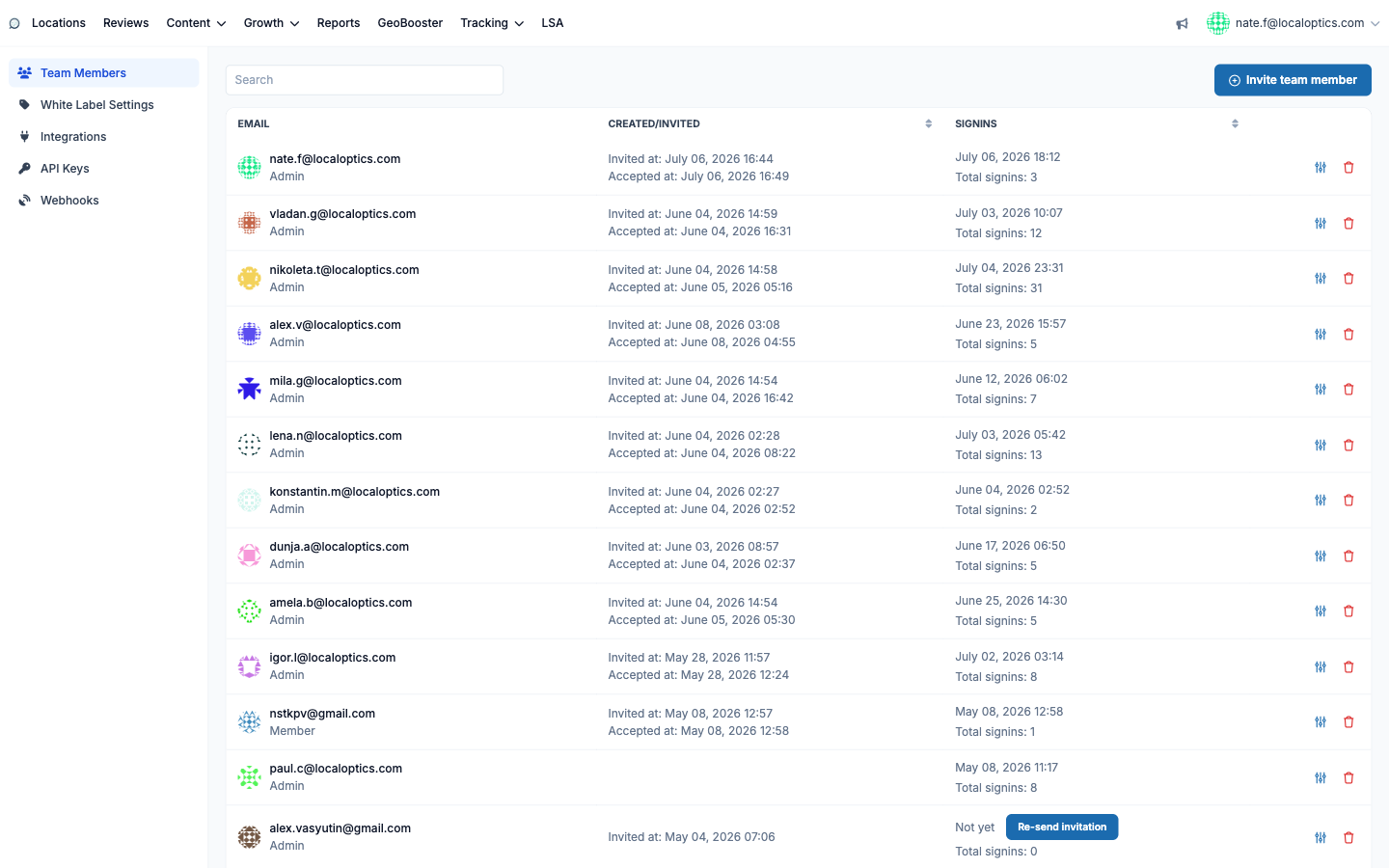
Team Members (in your account settings) is where you bring colleagues and clients into LocalOptics - each with exactly the access they should have.
Roles
Admin - full access, including all account settings and team management.
Member - day-to-day access that can be restricted to specific locations, by location tags or an explicit whitelist. Perfect for franchisees or client contacts who should only see their own listings.
Viewer - read-only access, also restrictable by location.
The Account Owner sits above all three and can't be edited or removed by anyone else.
Inviting someone
Click Invite team member, enter their email, name and role, and optionally set their time zone, beginning of week, notification preferences (scheduled geogrid emails, failed-post alerts) and - for Members and Viewers - their location restrictions. They receive an email invitation and set their own password. Until they first sign in, their row shows "Not yet" with a Re-send invitation button.
Managing the team
The list shows every user with their role badge, invitation and acceptance dates, last sign-in and total sign-in count - a quick way to spot dormant accounts. Edit (the pencil) to change role, restrictions or notifications; the trash removes the user. If you use GeoBooster, a member's check-ins can also be flagged to require moderation before publishing.
The Team Members page with roles, sign-in history and a pending invitation: